Arduino Police LED Strobes!

OK, sometimes your brain gets a little fried on a project and you need to decompress a little right? That happened a little while ago, and here is the result. I have this awesome little 10th scale 40mph+ Losi stadium truck I play with now and then, and I have always wanted to do this. While the strobe modes are manually controlled with buttons, I have an urge to crack open my 2 channel transmitter and put a little ASK radio in there. Nothing like the element of surprise eh? What I really would like to do is make it autonomous. 🙂 Maybe later..

There are a few modes in the sketch, the video shows the first or “main” mode, but if you download the sketch the possibilities are endless to make calmer or even more obnoxious ones. I have noticed (not from my rear view mirror thankfully) the new LED bars on cop cars have a faster mode (almost like a boost mode) for high speed or high attention ares ie: intersections, but when they have someone pulled over, it is a slower pattern. Trust me, I know these things.

There are 20 (red and blue in: each of the headlights, tail lights, sides, and 4 red and blue in the light bar) “straw hat” style LED’s and they are driven by an Arduino and powered by a 3.7v Li-Po battery, you can buy them at adafruit.com. There is not an actual Arduino inside, just a 328 programmed with the Arduino IDE. It’s way cheeper that way. (I tend to put 328 chips in a lot of stuff) Below is the sketch for your hacking. A really good tutorial on “LED blinky modes” can be found from Lady Ada here. I actually learned a lot from this tutorial series a while ago, but still reference it from time to time. Good stuff.

Click the picture to see the full image of the truck (4.7MB) You can see how dirty it is.. :\

Download the sketch here. (Arduino .pde file)
Dual Boot LED Control, RGB to HEX Converter

OK, so a while ago I fell in live with these Nokia 5110/3310 LCD displays. They use a library from adafruit.com that you can find here. They are small, fast, and don’t gobble up a lot of current. So I needed a project to make so I could use one. The result? A massive overkill of an LED controler with all kinds of options and features.

So I was thinking about a RGB to HEX Color converter that I had made for the 2.8″ TFTLCD, and the fact that I might want to figure out values without erasing my sketch I’m working on. Although it’s nice to see the color displayed on the screen it will end up on, sometimes you just need a quick answer. Thanks to brookware2000 (in the Adafruit forums), there is a nice small program here that will do the trick. But it runs on Windows, and I’m kind of a Mac guy. The answer? Build one into my nifty little box that already has 8 buttons, an RGB LED, and a nice LCD screen! So here it is.

Download the code here. (Arduino 22 .pde file) This is a version of the code that just has the color converter, I’ll do a video sometime of how to do the dual boot/setup thing.

**Notice the line “PCD8544 nokia = PCD8544(13, 12, 8, 7, 5);” This is not the default pin assignments for the Nokia LCD Tutorial. (default pins are 7, 6, 5, 4, 3) You will need to adjust the wiring for this sketch to work. Pay attention to what pins are used for buttons and LED’s. 🙂

JOS – Open Source Menu Interface for Arduino/TFTLCD

***UPDATE*** There is updated code that works with the current Adafruit libraries! New post is here. 🙂

So I ordered a 2.8″ TFTLCD with touchscreen from Adafruit and really wanted to do more than 1 “screenfull” of stuff. So I stayed up all night and wrote this. Now I want to share it. I was waiting to post this until I got my code a little cleaned up and put in a good number of comments. My code might not be as optimal as it could be, so go easy on me, I’m still a newbie..

Here is a video about what this does.

And here is a video about the code.

JOS stands for Jeremy’s Operating System and is open source. I encourage you to use it, hack it, and do what ever you want with it. I know some might say “it’s not an operating system!” I know, but it’s just a name. It is based on Lady Ada’s TFTLCD and TouchScreen libraries. It shares some of the code from Lady Ada’s tftpaint sketch found in the TFTLCD library. It is written in the Arduino IDE and works perfect with the 2.8″ TFTLCD breakout board and the Touch Shield. This version does not support and SD card/bitmap functions as I do not have a touch shield yet. I will write these in when I get a Touch shield some day.

Here is a feature List:

Menu driven button screens

5 different menu screens, 6 buttons per screen for a total of 30 separate functions

Customizable title bar for indicators, custom icons and titles

Easily adjustable dual color signal indicator (for wireless application) for the title bar

Home icon for easy navigation

Dedicated message box for notifications

PWM controlled adjustable backlight

Settings menu with adjustable sleep time and backlight

Sleep and backlight settings saved in EEPROM – retains settings after power down

Sleep mode, for backlight, including fade in from sleep  and fade out to sleep

Template for 3rd adjustable item on settings menu

Dual color battery icon with active and adjustable monitoring

LED output for button press indication – adjustable or removable

2 LED outputs for indication – adjustable or removable

All LED activity used only 2 pins

pins 0 and 1 not used and reserved for for serial communication

pins 11, A0, A1, A4, A5 open for I/O

Code is commented to explain function

Hardware Wiring: The same wiring as found in the Adafruit TFTLCD tutorial here. Continue reading

“Breathing” Sleep LED

I always have loved Apple and their non-jerky, fluid like GUI in all of their OS’s. Then I noticed it even with their hardware when I got my MacBook Pro over 3 years ago. My older PC’s always had a flashing sleep LED. That was fine until I saw the “breathing” LED pattern that Apple did on the Mac products. Much nicer. 🙂 I saw these awesome cufflinks with the same “breathing” pattern, and got inspired to write a little Arduino sketch to replicate it. So I did.

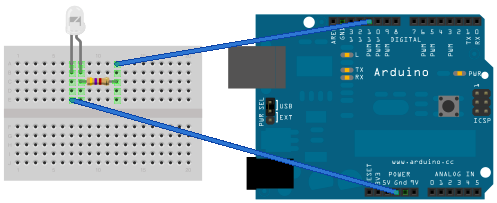
LED to pin 11, that all.

This is a really simple sketch, only one thing I did was vary the timing in the fade to smooth out the take off and landing. You will see that in all of the if statements inside the dimming function.

You can download the sketch here.

Bench lights (LED’s, CCFL’s, and a little overkill..)

OK, so about a year or so ago, I was working at my bench and I could not quite see what I was doing. I needed more light! I got so mad, I built this in about a half a day, and fixed the problem. Now I have enough light even when working on tiny things with magnifiers on my head.

I now have 4 white 12″ CCFL tubes, 6 1 watt warm white LED’s, 144 cool white LED’s (in strips), and 12 5mm diffused white LED’s under the bench pointed at the floor (did you ever drop anything?). All the LED’s are ramped on and off with PWM dimming as you will see in the video above. I also have 2 more channels available with full PWM dimming. Running everything wide open will allow you to see very well, and only consumes 17 watts.

A little overkill, but I was really frustrated. And hey, who just wants a plain ole boring switch anyway? Not me…